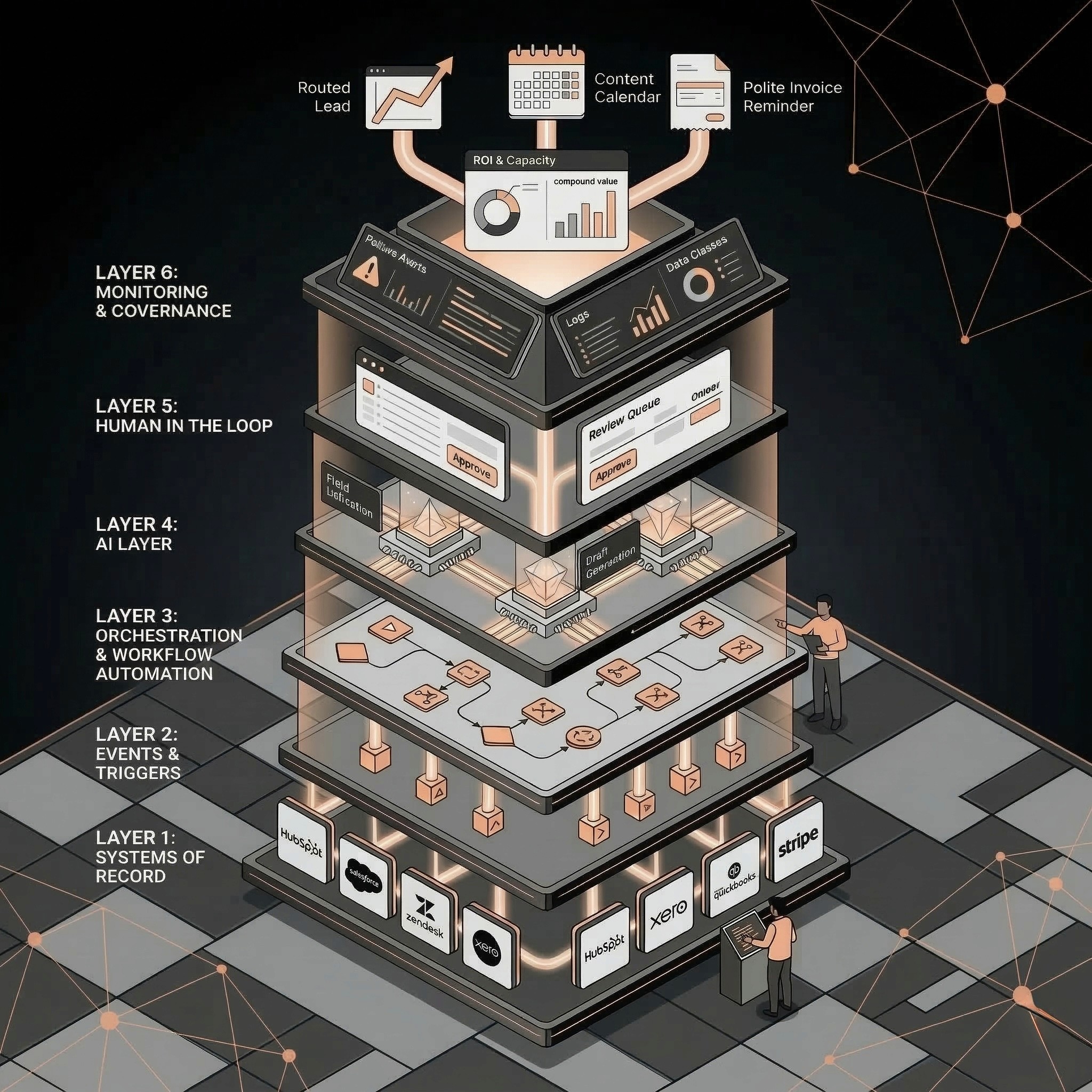
HubSpot AI automation helps SMBs use workflows, CRM actions, Breeze AI features, branches, delays, and agent actions to reduce manual sales, marketing, service, and RevOps work. The best first HubSpot AI automations improve lead response, CRM data quality, routing, summaries, and follow-up while keeping risky customer or revenue decisions human-approved.
Sales
Have a workflow to improve?
Discuss an automation project
Working on post-call CRM? Run the free readiness check
HubSpot AI automation helps SMBs use workflows, CRM actions, Breeze AI features, branches, delays, and agent actions to reduce manual sales, marketing, service, and RevOps work. The best first HubSpot AI automations improve lead response, CRM data quality, routing, summaries, and follow-up while keeping risky customer or revenue decisions human-approved.
HubSpot can already automate a lot. The hard part is deciding what should be automated first.
For SMBs, the answer is rarely “turn on every AI feature.” The better path is to choose one workflow where HubSpot is already the system of record and where faster response, cleaner data, or better handoffs create measurable value.
What HubSpot AI Automation Can Include
HubSpot automation can combine classic workflow logic with AI-assisted actions.
Based on HubSpot’s current Knowledge Base, relevant building blocks include:
• Workflows for marketing, sales, service, CRM, Revenue Hub, and Data Hub processes.
• Workflow actions grouped by type, including delays, branches, communication actions, CRM actions, AI actions, and connected-app actions.
• Breeze Assistant support for creating workflows and adding or editing workflow actions.
• Breeze actions that summarize records and associated records.
• Breeze data actions that analyze, summarize, categorize, research, or fill smart properties in workflows.
• Agent actions that can be run from workflows.
• Branches and delays for timing, conditions, and routing logic.
The practical takeaway: HubSpot AI automation is strongest when AI actions are embedded inside a clear workflow, not treated as a standalone magic layer.
Official source references for implementation details:
• https://knowledge.hubspot.com/ai/understand-breeze
• https://knowledge.hubspot.com/workflows/use-ai-assistants-in-workflows
• https://knowledge.hubspot.com/workflows/choose-your-workflow-actions
• https://knowledge.hubspot.com/workflows/use-breeze-to-research-and-summarize-data-in-workflows
• https://knowledge.hubspot.com/workflows/use-ai-to-manage-data-in-workflows
• https://knowledge.hubspot.com/workflows/run-agents-using-workflows
What to Automate First in HubSpot
Start with workflows that are already close to your CRM data.
Priority: 1; Workflow: Lead response and routing; Why it works well in HubSpot: New leads, owners, lifecycle, tasks, and email context often live in HubSpot; Human approval rule: Approve high-value or ambiguous replies
Priority: 2; Workflow: CRM cleanup; Why it works well in HubSpot: HubSpot is the system of record for contacts, companies, deals, and lifecycle fields; Human approval rule: Approve merges and destructive changes
Priority: 3; Workflow: Meeting prep and follow-up; Why it works well in HubSpot: Activity, deal, contact, and company context can be summarized; Human approval rule: Approve customer-facing commitments
Priority: 4; Workflow: Customer success summaries; Why it works well in HubSpot: Tickets, notes, activities, and associated records can inform account summaries; Human approval rule: Approve churn or escalation decisions
Priority: 5; Workflow: Pipeline reporting; Why it works well in HubSpot: CRM properties and workflow outputs can feed reporting; Human approval rule: Human reviews forecast decisions
Do not start with the flashiest workflow. Start with the workflow where bad data, slow response, or manual handoff is already costing the team.
HubSpot Data Readiness Checklist
Before adding AI actions to HubSpot workflows, check whether the core CRM data is usable.
HubSpot object or feature: Contacts; Readiness question: Are email, owner, source, lifecycle stage, and recent activity reliable?; Why it matters: Lead follow-up and segmentation depend on contact data
HubSpot object or feature: Companies; Readiness question: Are domains, company names, size, industry, and region clean?; Why it matters: Account routing and enrichment depend on company context
HubSpot object or feature: Deals; Readiness question: Are amount, stage, owner, close date, and associated contacts maintained?; Why it matters: Pipeline automation needs accurate deal context
HubSpot object or feature: Tickets; Readiness question: Are ticket category, priority, status, and associated company reliable?; Why it matters: Service automation needs clean support context
HubSpot object or feature: Lifecycle stages; Readiness question: Are definitions consistent across marketing, sales, and CS?; Why it matters: AI routing fails if stages mean different things
HubSpot object or feature: Properties; Readiness question: Which fields can AI update, suggest, or never touch?; Why it matters: Prevents silent CRM damage
HubSpot object or feature: Lists; Readiness question: Are target segments based on clean properties?; Why it matters: Nurture and routing workflows depend on list quality
HubSpot object or feature: Tasks; Readiness question: Are owner and due-date rules clear?; Why it matters: Automation should create work the team will act on
HubSpot object or feature: Sequences; Readiness question: Which messaging steps require human approval?; Why it matters: Prevents uncontrolled outreach
HubSpot object or feature: Reporting; Readiness question: Which dashboards prove value?; Why it matters: Automation needs a measurable business case
If the data is not ready, start with CRM cleanup before adding more AI.
HubSpot Lead Response Workflow
Example workflow:
1. A contact submits a demo, audit, or contact form.
2. HubSpot enrolls the contact in a workflow.
3. The workflow enriches or checks key CRM fields.
4. AI summarizes the request and likely use case.
5. Branches route by company size, region, workflow type, or urgency.
6. The workflow creates a task for the right owner.
7. AI drafts a first reply or internal note.
8. High-value leads require human approval before sending.
9. HubSpot records response status and SLA timing.
This supportsAI sales automationbecause it improves speed to lead without removing human judgment.
HubSpot CRM Cleanup Workflow
Example workflow:
1. Enroll contacts or companies missing required fields.
2. Use rules to identify exact missing values.
3. Use AI or enrichment actions to summarize or categorize available context.
4. Fill low-risk properties where confidence is high.
5. Create review tasks for fuzzy duplicates, lifecycle changes, or strategic accounts.
6. Branch records by confidence level.
7. Log the cleanup source and date.
8. Report weekly on completeness, duplicates, and review backlog.
This supportsAI RevOps and CRM automationbecause clean CRM data is the foundation for sales, marketing, RevOps, and reporting automation.
HubSpot Customer Success Summary Workflow
Example workflow:
1. Enroll companies before renewal or QBR dates.
2. Summarize associated tickets, notes, deals, and activities.
3. Classify account themes: adoption, blockers, support friction, expansion signals.
4. Create a prep task for the customer success owner.
5. Draft renewal or check-in talking points.
6. Escalate accounts with negative themes or missing owner activity.
AI should prepare the account context. Humans should own relationship judgment.
This supportsAI customer success automation.
Approval Rules for HubSpot AI Workflows
Action: Create internal summary; Safe to automate?: Yes; Recommended control: Log source records
Action: Create task; Safe to automate?: Yes; Recommended control: Include reason and workflow name
Action: Fill low-risk blank property; Safe to automate?: Sometimes; Recommended control: Use confidence and source tracking
Action: Route lead; Safe to automate?: Yes for clear rules; Recommended control: Escalate exceptions
Action: Draft email; Safe to automate?: Yes; Recommended control: Human approval for high-value/risky leads
Action: Send email; Safe to automate?: Sometimes; Recommended control: Limit to low-risk templates
Action: Merge records; Safe to automate?: No at first; Recommended control: Human approval
Action: Change lifecycle stage; Safe to automate?: Sometimes; Recommended control: Review open opportunities and customers
Action: Change owner; Safe to automate?: Sometimes; Recommended control: Review strategic accounts
The best HubSpot AI automation is not the one with the most AI. It is the one with the clearest approval model.
Metrics to Track
Track workflow performance inside the operating rhythm:
• Lead response time.
• Time to owner assignment.
• CRM field completeness.
• Duplicate recommendation accuracy.
• Follow-up task completion.
• Meeting prep time saved.
• Customer success prep time saved.
• Review queue size.
• AI draft approval rate.
• Manual hours saved.
UseAI automation ROI calculatorto convert time saved and conversion lift into payback math.
What Not to Automate First
Avoid these as first projects:
• Fully autonomous outbound sequences with no approval.
• Public chat or support automation without a clean knowledge base.
• Bulk CRM overwrites.
• Lifecycle-stage changes with no QA.
• Forecasting workflows before CRM data is clean.
• Workflows nobody has manually mapped.
If the manual process is unclear, useAI automation audit checklistfirst.
Related Resources
• AI sales automation:AI sales automation
• AI RevOps and CRM automation:AI RevOps and CRM automation
• AI customer success automation:AI customer success automation
• AI automation for SMBs:AI automation for SMBs
• AI lead follow-up automation:AI lead follow-up automation
• AI CRM cleanup automation:AI CRM cleanup automation
• AI Operator role:AI Operator
• AI operator vs AI agent:AI Operator vs. AI agent
• AI automation ROI calculator:AI automation ROI calculator
• AI automation audit checklist:AI automation audit checklist
FAQs
What is HubSpot AI automation?
HubSpot AI automation combines HubSpot workflows, CRM actions, branches, delays, Breeze AI features, and agent actions to automate sales, marketing, service, RevOps, and CRM processes.
What should SMBs automate first in HubSpot?
Start with lead response, CRM cleanup, meeting prep, customer success summaries, and pipeline reporting. These workflows are close to CRM data and have clear business metrics.
Can HubSpot Breeze build workflows?
HubSpot documentation says Breeze Assistant can help create workflows and add or edit workflow actions, while workflow triggers and final setup still require user configuration and review.
What HubSpot AI workflows need human approval?
Human approval should remain for high-value sales replies, pricing or scope promises, destructive CRM merges, strategic account owner changes, lifecycle changes on open opportunities, and sensitive customer decisions.
How do you measure HubSpot AI automation ROI?
Measure response time, owner assignment time, CRM completeness, task completion, manual hours saved, conversion lift, review queue size, and AI draft approval rate.
Choose your next step
Missing owners or next steps after recorded sales calls? Start with the ungated check below to measure a sample and review approvals. For broader HubSpot work, share your requirements as a project enquiry.