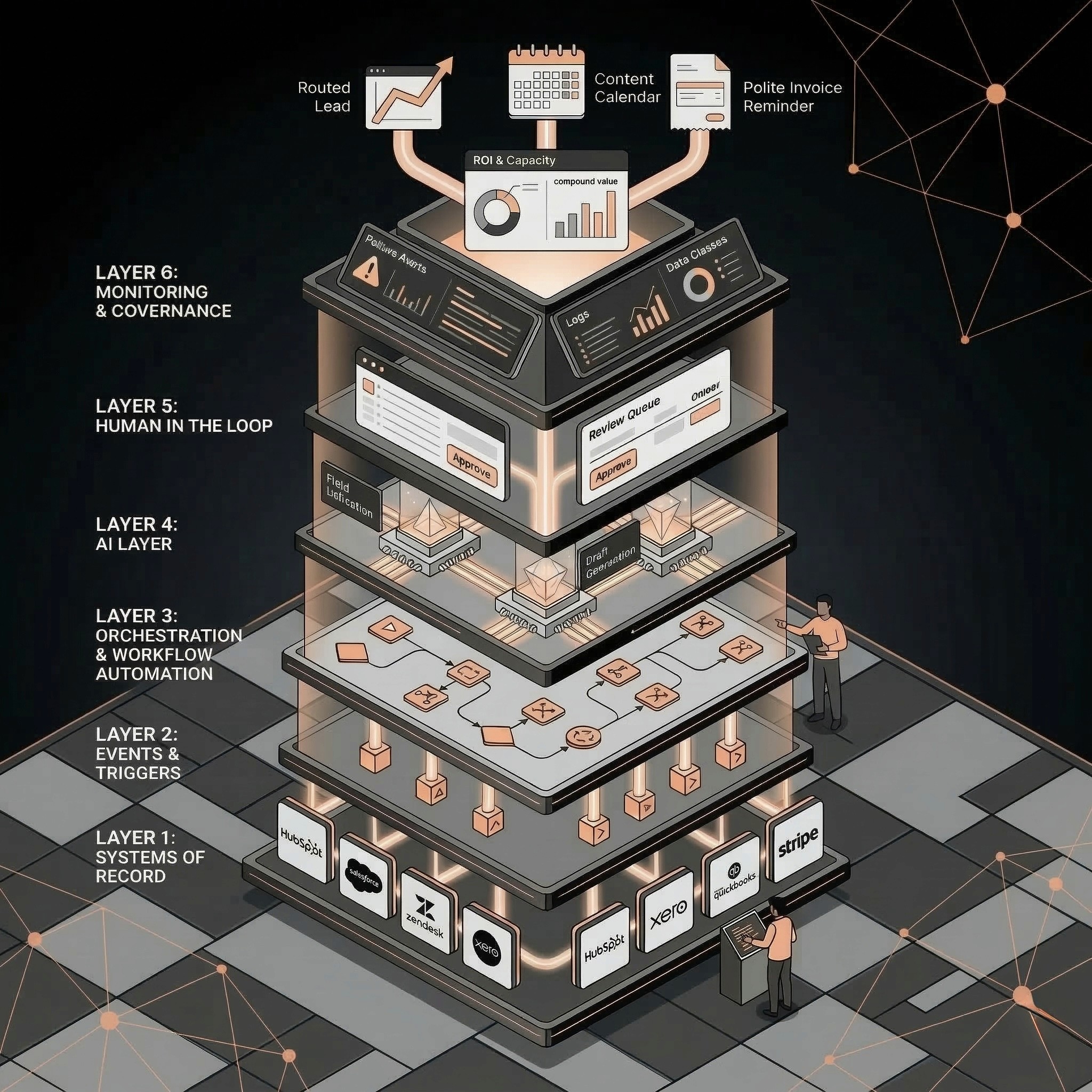
AI CRM cleanup automation uses rules and AI classification to detect duplicate records, standardize fields, enrich missing company data, classify lifecycle stage, route leads, and flag risky changes for human review. The safest version automates cleanup recommendations and low-risk updates while keeping destructive merges and high-value account changes human-approved.
Sales
Have a workflow to improve?
Discuss an automation project
Working on post-call CRM? Run the free readiness check
AI CRM cleanup automation uses rules and AI classification to detect duplicate records, standardize fields, enrich missing company data, classify lifecycle stage, route leads, and flag risky changes for human review. The safest version automates cleanup recommendations and low-risk updates while keeping destructive merges and high-value account changes human-approved.
A dirty CRM quietly taxes every revenue motion.
Sales wastes time on duplicates. Marketing targets the wrong segment. Customer success misses risk signals. Leadership questions the forecast. AI can help, but only if CRM cleanup is treated as a governed workflow rather than a bulk edit spree.
Before you buy another AI sales tool, clean the data it will reason from.
What AI CRM Cleanup Automation Does
CRM cleanup automation improves the quality of the records that power sales, marketing, customer success, and reporting.
Common jobs:
• Detect duplicate contacts, companies, deals, or tickets.
• Standardize company names, industries, regions, and sizes.
• Enrich missing firmographic fields.
• Classify lifecycle stage or lead status.
• Identify stale records.
• Route leads based on segment, territory, or use case.
• Flag bad owner assignment.
• Summarize account context.
• Prepare merge recommendations.
• Create QA queues for human review.
AI is most useful when the cleanup requires interpretation. Rules are better for exact matches, required fields, and deterministic routing.
Symptoms of a CRM That Needs Cleanup
Your CRM probably needs automation if:
• The same company appears under several names.
• Sales reps do not trust lead owner fields.
• Marketing segments are too messy to target.
• Reports require spreadsheet cleanup every week.
• Lifecycle stage does not match actual buyer status.
• Customer success cannot see account context quickly.
• Lead source data is incomplete.
• Important records are missing company size, industry, or region.
• Revenue meetings start with arguments about data quality.
The cost is not only admin time. Dirty CRM data makes every AI workflow less reliable.
Safe CRM Cleanup Workflow
Cleanup step: Required-field detection; Best method: Rules; Human approval?: No; Notes: Flag missing source, owner, lifecycle, industry
Cleanup step: Exact duplicate detection; Best method: Rules; Human approval?: Sometimes; Notes: Auto-flag; approve destructive merges
Cleanup step: Fuzzy duplicate detection; Best method: AI plus rules; Human approval?: Yes; Notes: Use confidence threshold and review queue
Cleanup step: Company enrichment; Best method: Data provider plus AI summary; Human approval?: Review low confidence; Notes: Log source and timestamp
Cleanup step: Lifecycle classification; Best method: AI plus rules; Human approval?: Review strategic accounts; Notes: Compare against recent activity
Cleanup step: Lead routing; Best method: Rules plus AI use-case classification; Human approval?: Review exceptions; Notes: Keep owner override path
Cleanup step: Record merging; Best method: Rules plus human approval; Human approval?: Yes; Notes: Never make destructive merges invisible
Cleanup step: Reporting summary; Best method: AI; Human approval?: No for summary, yes for decisions; Notes: Treat as decision support
The principle is simple: automate detection, enrichment, and recommendations first; automate destructive changes last.
What AI Can Classify
AI can help classify messy text and context that normal rules struggle with.
Useful classifications:
• Lead use case.
• Industry from company description.
• Persona from job title.
• Urgency from form text.
• Account fit from firmographic context.
• Support or success theme.
• Renewal risk signal.
• Deal blocker.
• Next-best owner.
Risky classifications:
• Legal status.
• Contract obligations.
• Final account tier.
• Credit or refund decisions.
• Anything that changes customer commitments.
Use AI classification to prepare decisions, not hide decisions.
Required CRM Fields Before Automation
Field: Company name; Why it matters: Deduplication and account matching; Cleanup rule: Standardize formatting and domain association
Field: Email domain; Why it matters: Contact-company association; Cleanup rule: Flag personal domains for review
Field: Lifecycle stage; Why it matters: Sales and marketing handoff; Cleanup rule: Review open opportunities and customers
Field: Lead source; Why it matters: Attribution and reporting; Cleanup rule: Do not overwrite original source silently
Field: Owner; Why it matters: Routing and accountability; Cleanup rule: Review strategic account changes
Field: Industry; Why it matters: Segmentation; Cleanup rule: Use enrichment plus human review for low confidence
Field: Company size; Why it matters: Prioritization and fit; Cleanup rule: Use ranges, not brittle exact values
Field: Last activity date; Why it matters: Stale-record handling; Cleanup rule: Use for reactivation or cleanup queue
Field: AI confidence; Why it matters: Workflow QA; Cleanup rule: Require review below threshold
If these fields are unreliable, downstream AI sales and reporting workflows will be unreliable too.
Human Approval Rules
Good approval rules make CRM cleanup safe enough to scale.
Require human approval when:
• Merging records.
• Changing owner on strategic accounts.
• Updating lifecycle stage for open opportunities.
• Changing customer status.
• Deleting records.
• Overwriting source attribution.
• Updating high-value deal records.
• Confidence is below the threshold.
Allow automatic updates when:
• Filling blank non-critical fields with sourced data.
• Standardizing formatting.
• Adding tags or internal notes.
• Creating cleanup tasks.
• Routing low-value leads according to clear rules.
• Updating AI confidence or review status fields.
QA Checks and Logs
CRM automation needs observability.
Track:
• Field changed.
• Old value.
• New value.
• Change source.
• AI confidence.
• Rule or prompt used.
• Reviewer.
• Approval status.
• Timestamp.
• Rollback path.
Weekly QA sample:
Check: Duplicate recommendations; Sample size: 25 records; Pass target: 90 percent accurate
Check: Enriched company fields; Sample size: 25 records; Pass target: 85 percent accurate
Check: Lead routing; Sample size: 25 records; Pass target: 95 percent correct
Check: Lifecycle classification; Sample size: 25 records; Pass target: 85 percent accurate
Check: Owner override rate; Sample size: All exceptions; Pass target: Falling over time
If nobody checks the cleanup, the CRM will quietly get worse again.
Metrics to Track
The best CRM cleanup metrics are operational:
• Duplicate rate.
• Required-field completeness.
• Lead routing accuracy.
• Owner assignment time.
• Manual cleanup hours.
• Report preparation time.
• Sales follow-up SLA compliance.
• Marketing segment usability.
• Forecast/report trust.
Connect these metrics toAI RevOps and CRM automationand the ROI model atAI automation ROI calculator.
Related Resources
• AI RevOps and CRM automation:AI RevOps and CRM automation
• AI sales automation:AI sales automation
• AI automation for SMBs:AI automation for SMBs
• AI lead follow-up automation:AI lead follow-up automation
• AI readiness audit for SMBs:AI readiness audit for SMBs
• AI Operator role:AI Operator
• AI operator vs AI agent:AI Operator vs. AI agent
• AI automation ROI calculator:AI automation ROI calculator
• AI automation audit checklist:AI automation audit checklist
FAQs
What is AI CRM cleanup automation?
AI CRM cleanup automation uses rules and AI to detect duplicates, enrich records, standardize fields, classify lifecycle stages, route leads, and create human review queues for risky updates.
Can AI clean CRM data automatically?
AI can automate low-risk cleanup and recommendations, but destructive actions like merging, deleting, changing ownership on strategic accounts, or overwriting attribution should usually require human approval.
What CRM tasks should AI automate first?
Start with missing-field detection, enrichment suggestions, duplicate detection, lead routing support, stale-record flags, and internal summaries. These improve data quality without giving AI unchecked control.
How do you prevent bad CRM updates?
Use confidence thresholds, review queues, change logs, source tracking, rollback rules, and weekly QA samples. Do not let AI silently overwrite important business fields.
Should AI merge duplicate contacts automatically?
Usually no. AI can recommend likely duplicates and explain the reason, but humans should approve destructive merges until the workflow has proven accuracy on your data.
Choose your next step
Post-call field completeness is a narrower problem than database deduplication. Use the self-check for missing owners, next steps, and dates. Bulk cleanup, enrichment, and routing need separate project scoping.