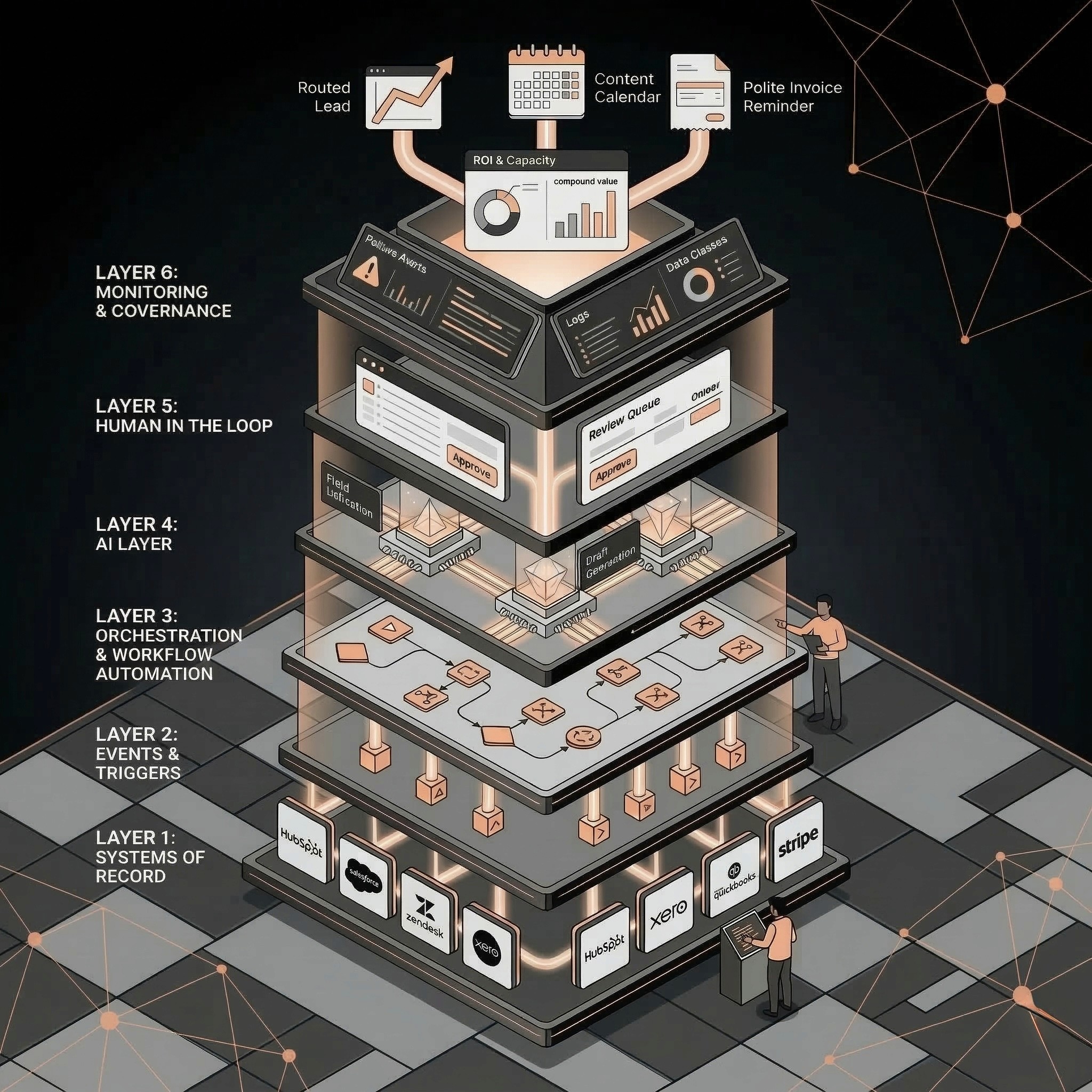
Most SMBs do not need more AI tools, they need a stack that reliably moves work forward across sales, marketing, ops, and support. This post explains a practical 6-layer SMB AI stack for 2026, the minimum tool categories that work, and the first workflows that deliver compounding value. It includes a 14-day implementation framework, a checklist, and concrete time savings math.
You can feel the pressure to "do AI" in every department, but most SMBs do not need 40 tools. They need an SMB AI stack that turns the systems they already pay for into reliable workflows: leads routed correctly, follow ups sent on time, invoices handled, tickets triaged, and reporting kept current.
This guide breaks down a practical SMB AI stack for 2026: what to include, what to skip, and how to integrate it without creating a brittle mess. It is written for operators who need outcomes, not experiments.
TL;DR
Build your stack around systems of record, not around shiny AI tools.
Standardize one automation backbone, one knowledge source, and one measurement view.
Start with three workflows that touch revenue and remove manual handoffs.
Add guardrails early: permissions, human approval, and monitoring.
Playbook
Have a workflow to improve?
Discuss an automation project
Working on post-call CRM? Run the free readiness check
The SMB AI stack for 2026: a practical definition
For an operator, the SMB AI stack is not a shopping list. It is a set of connected systems that can move work forward with minimal manual effort, while keeping humans accountable for decisions.
To make that real, think in layers. You do not need every layer to be a separate tool, but you need every layer covered.
Layer 1: Systems of record
These are the sources of truth where the business lives:
CRM (HubSpot, Salesforce, Pipedrive)
Support (Zendesk, Intercom, Help Scout)
Finance (QuickBooks, Xero, Stripe)
Project management (Asana, Jira, ClickUp)
Rule: automations should write back to systems of record, not just send messages.
Layer 2: Events and triggers
SMBs run on events: a lead submits a form, a deal stage changes, an invoice becomes overdue, a ticket gets tagged.
In 2026, the winning pattern is still: trigger from a clean event, enrich, then act.
Layer 3: Orchestration and workflow automation
This is your automation backbone, where you string actions together. Common SMB choices include Zapier, Make, and n8n. The discipline matters more than the brand: pick one as your default, document conventions, and avoid duplicating logic across tools.
Layer 4: AI layer
Most valuable AI work in SMBs is unglamorous:
Extract fields from messy inputs
Classify and route work
Draft first versions that humans edit
Summarize long histories into decisions
Layer 5: Human in the loop
If a workflow can cause customer impact, money movement, or compliance issues, add an approval step. In practice: a Slack approval, a CRM task, or a review queue.
Layer 6: Monitoring and governance
If you cannot answer "what broke, when, and who was impacted," you do not have production automation.
Minimum viable controls:
Central logs for workflow runs
Failure alerts to a shared channel
Basic access rules for who can publish changes
Tools that actually work for an SMB AI stack
A good stack has fewer tools than you think. Selection criteria should be boring.
Selection criteria that prevent tool sprawl
Before adding anything, ask:
Does it integrate cleanly with our systems of record?
Can we control access and keep an audit trail?
Can we monitor failures and retries?
Can a non engineer maintain it?
If you cannot answer yes to at least two of the last three, it is probably a nice demo, not a stack component.
The minimum viable categories
Most SMBs can cover the majority of value with:
One integration and automation tool
One communication hub (Slack, Teams, email)
One place for process docs (Notion, Confluence, Google Drive)
CRM, support, and finance systems you already run
A basic analytics layer (dashboards are fine)
Add specialist tools only after you have proven the workflow and hit real limits.
The workflows that pay off first in 2026
If you want compounding returns, start with workflows that improve speed, quality, and data accuracy at the same time.
Sales: lead enrichment, routing, and first follow up
Typical flow:
Capture inbound lead
Enrich company and role data
Assign owner and SLA based on ICP and territory
Draft first touch email and call notes
Create tasks in the CRM
AI helps most with fit classification, summarizing activity history, and drafting.
Marketing: content production with brand constraints
A lean team can use AI workflow automation to:
Turn SME notes into a structured brief
Draft variants for different channels
Run a brand check and compliance pass
Push tasks into a calendar with a checklist
AI helps with summarization, rewriting, and structured outputs.
Ops and finance: reminders plus exception handling
Automation wins are often in admin work:
Check invoice status
Flag overdue accounts
Draft a polite reminder
Route exceptions to a human and log the outcome
AI helps with extracting context and drafting.
Support: triage and resolution suggestions
You can reduce time spent on repetitive tickets by tagging and routing, summarizing long threads, and suggesting macros.
AI helps with categorization and summarization.
A concrete example with numbers: what "stack value" looks like
Consider a 30 person B2B services SMB with 4 sales reps, 2 marketers, and 3 people in ops and finance.
Before automation, the team spends time on glue work:
Sales ops: 10 inbound leads per day need enrichment and routing. Each takes 6 minutes to research and update in the CRM. That is 10 x 6 = 60 minutes per day, about 20 hours per month.
Marketing repurposing: one webinar per month is turned into a blog, a newsletter, and 6 social posts. Manual repurposing takes 14 hours.
Ops reminders: 80 invoices per month, and 15 percent need a reminder. Each reminder takes 5 minutes to check status, draft, and log. That is 80 x 0.15 x 5 = 60 minutes per month.
Now assume the SMB ships three workflows:
Lead enrichment and routing reduces 6 minutes to 1 minute of review and approval.
Webinar repurposing reduces 14 hours to 5 hours, because drafts are generated and a marketer edits.
Invoice reminders reduce 5 minutes to 1 minute review, because status and a draft are prefilled.
Monthly capacity reclaimed:
Sales ops: 20 hours becomes about 3.5 hours, saving 16.5 hours.
Marketing: 14 hours becomes 5 hours, saving 9 hours.
Ops: 1 hour becomes 0.2 hours, saving 0.8 hours.
Total: about 26.3 hours per month.
If your blended fully loaded cost is £45 per hour, that is 26.3 x 45 = £1,183.50 per month in capacity. Treat that as a planning example, not a promise. The real win is predictability: fewer bottlenecks and cleaner handoffs.
Step by step framework: build your SMB AI stack in 14 days
You can move fast if you avoid tool debates and focus on integration.
Step 1: Inventory your systems of record
List CRM, support, finance, marketing, docs, and the owner for each. Be explicit about what data is authoritative.
Step 2: Choose your automation backbone
Pick one default automation tool. Define conventions:
Workflow naming scheme
Where secrets live
Where logs live
Retry and failure rules
Step 3: Define golden identifiers
Most workflow bugs come from identity mismatch. Define:
Company domain as a stable company key
Contact email as a stable contact key
Deal ID and invoice ID as stable transaction keys
If you cannot join data between systems, AI will not save you.
Step 4: Create a curated knowledge layer
AI needs context. Centralize:
ICP rules and disqualifiers
Brand voice and examples
Product, pricing, and policy notes
Support macros and escalation rules
Step 5: Ship three revenue connected workflows
Pick one from sales, one from marketing, and one from ops. Keep the design small: trigger, enrich, draft, approve, log.
Step 6: Add approvals and monitoring
Non negotiables:
Any outbound message gets human review at first
Any money movement is always human approved
Any failure triggers an alert with context and a fallback
Step 7: Review weekly
Track:
Cycle time reduction (lead to first touch, ticket to first response)
Error rate (runs needing manual fix)
Adoption (percent of output used)
FAQ
What is the best SMB AI stack for a team under 50?
The best SMB AI stack connects your CRM, support, and finance systems through a single automation backbone, with a curated knowledge base and simple monitoring. Start with a few workflows that remove handoffs, then expand.
Do SMBs need a data warehouse to use AI workflow automation?
Not at first. Many SMBs get value with clean identifiers, reliable events, and basic dashboards. A warehouse becomes useful when you need cross system analytics and more complex attribution.
How do I keep AI automations on brand?
Centralize brand rules and examples in a single knowledge layer, enforce structured outputs, and require human approval for outbound content until quality is consistent.
Which workflows should I automate first?
Start with high volume, easy to standardize workflows tied to revenue or support load: lead routing, follow ups, ticket triage, and invoice reminders.
A helpful next step
If you want a second set of eyes on your SMB AI stack, AI Operator can help you audit what you have, pick the minimum set of tools, and deploy a few production ready workflows with measurement baked in. The goal is fewer bottlenecks, not more subscriptions.